
Ajax live search, enhance your site’s search experience
If your website has a lot of pages, a good working search function becomes more important. Is your website based on WordPress? Then you don’t need to worry about the search function, because it’s a standard feature. But how about a great search experience? Relevant search results are one part of the game, but how about the search interface? The Ajax live search will help your visitors to find your information faster without reloading the current page. Sounds like magic? It isn’t! In this blog post I will tell you all about Ajax search.

What is Ajax and how does Ajax search work?
Ajax is not so new anymore and it stands for Asynchronous JavaScript and XML. By using this technology, your script will post a request to the server and in return the script will get a response without a page reload. Like the name suggests, the submitted data should be formatted as an XML structure.
Ajax search is nothing more than a regular search query post by a web form, but the whole process is done in the background using JavaScript. The JavaScript code will use the search value from a form field for the Ajax request and the server will use the received data for a database query. The response is returned to the same Javascript file and at last passed to the HTML page.
Every time a user enters more characters into the search field, a new request is sent to the server. A typical Ajax search will work with the “input” event which is fired after the value from a form element is changed.
Ajax search vs. regular search
Based on the information above it looks like the Ajax search is a great replacement for the regular search. Sure, there are a lot of advantages:
- Basic form field validation without a server request
- Frontend and backend code are separated
- The search is faster and more user friendly
- Combine form element values without reloading the page
- Using Ajax search on static websites
But there are also disadvantages, like:
- Accessibility issues, because the response is loaded dynamically into the HTML structure
- Server side data validation is still necessary
- The browser back button doesn’t bring you back to the previous search result (compared to a result page with a query string inside the URL)
- A higher server load because a new request is submitted with every character typed in the search form
- You can’t create a (cached) pages for search results.
Which of both search interfaces is best, depends on your website and how visitors use your search function. Check your Ajax live search on different devices like iPads and cell phones. The search might not work for users on small screens.
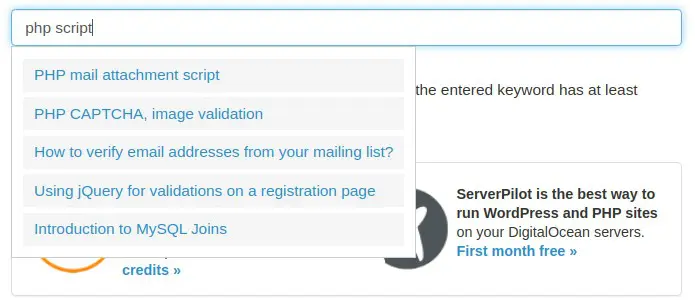
Ajax live search code example
For my example, I’ve used the jQuery library which has different methods to handle Ajax requests. On the server side I use a small PHP script to query the MySQL database. For the HTML page I use a starter template for the Bootstrap CSS framework.
The important part inside the index.html file starts on row 37. Inside the form element I have an element with the class “ajax-search”. I use the class name for styling. The ID “keyword” from the input element is used later to address the search value. The unordered list element is used for the Ajax live search results.
Enter the different database parameters to create a database connection. If the post variable named “keyword” is not empty and the value is longer or equal 3, then the value will be sanitized and added to the MySQL query. If the database query result has any rows, the loop is used to pass the values into an array. At the end we output the array data in a JSON formatted string.
On row 2-4 we store the value from the “keyword” element inside the variable “searchKeyword” and use than some simple validation. Only if the string length is bigger or equal than 3, the variable is used to post the data to the server (file search.php). If the callback function sends back the response, the content container gets a second CSS class and the JSON formatted string is parsed as list elements inside the loop starting on row 7.
If the variable “searchKeyword” is shorter than 3 characters the content container will be emptied and the class “active” is removed from the element.
The example code is very basic, but gives a good idea how easy it is to create an Ajax live search for your website. If you would like to see the code in action, just try the live search demo. You can download the example code including the CSS style from my Gist on Github.
Ajax live search for WordPress websites
WordPress has a good native search mechanism and there are also a lot of plugins that improve the search results and the search interface. It’s not so much work to change the (PHP) code for WordPress, but there are much better solutions.
SearchWP Live Ajax Search
I use this plugin for several client websites and the main reason is, that it works. For most WordPress themes the plugin “works out of the box”. Just activate the plugin and start using it. The plugin is written for the plugin SearchWP, but it also works perfectly if you use something else.
Do you need more control over the search results in your WordPress website? Use the SearchWP plugin as well. The free version works fine for “normal” websites and blogs and if you need more, just upgrade to the premium version.
Ajax Live search functions in WordPress themes
The Ajax search function is also included in many WordPress themes. If you use one of those themes, an additional plugin is not necessary. We discovered the Ajax search in themes like OceanWP (via the Core extensions bundle), Flatsome and Enfold.
Ajax live search for webshops with WooCommerce
Ajax search and filters are very important for webshops. For many client projects I use the premium plugin ‘FacetWP’, which offers not only a live search feature, but also filters for taxonomies and other product attributes. You will find much more plugins if you search the WordPress plugin repository,
Are there other search options?
If you don’t have a WordPress website or the search on your custom website doesn’t work very well, you can try the following options:
Google Custom Search Engine
This is maybe the easiest way to create a site search for your website. Just create your own search engine and let Google do the work. Except for the search widget, you don’t need to change any code in your website. The search widget doesn’t have a live search feature, but the whole search engine is based on Ajax.
Doofinder
If your website is built with a database, Doofinder might be an option even if your website is not based on WordPress. By providing a data feed, Doofinder will build a search index for your website. The result? An Ajax powered search feature like you know from the bigger webshops. The free version is only good for smaller sites, but in my opinion the bigger (paid) plans from Doofinder are affordable too.
SearchIQ
This site search is similar to Doofinder, but it has also a complete WordPress plugin. They offer interesting features like cross domain search and they can crawl your entire website, if you can’t provide a data feed. The while functionality is based on Ajax and the search widget offers the Ajax live search too. The free version is good for a website with 2000 pages.
Not sure which solution is best for your website? Try them all and decide then. All options we mentioned are available for free or offer a free trial.
Published in: jQuery Code · WordPress Development
